
Download Windows Password Cracker – Free, Secure, Fast Recovery Tool for Lost Login Credentials
What Is Windows Password Cracker? A Reliable Solution for Forgotten Logins
Losing access to your Windows account due to a forgotten password can be incredibly frustrating—especially if you have important files, personal documents, or work-related data locked behind the login screen. That’s where Windows Password Cracker comes in as a powerful recovery solution. This free software is specifically designed to help users regain access to their Windows systems when they’ve lost their login credentials. Unlike many third-party tools that promise quick fixes, Windows Password Cracker takes a methodical approach using a combination of brute force and dictionary-based attacks to crack passwords effectively.
The software leverages a comprehensive dictionary of over 53,000 commonly used characters and words across multiple languages, making it highly effective for users worldwide. Whether you're in Europe, Asia, or North America, the tool adapts to regional language patterns, increasing the likelihood of successful recovery. It processes more than a million password combinations per hour, ensuring steady progress even on older hardware. While the process can take several hours—often best left overnight—the ability to pause and resume the cracking session gives users full control over their recovery timeline.
It’s important to note that Windows Password Cracker only works on systems protected by the SYSKEY Microsoft security protocol. If your system doesn’t use this protection, the tool won’t be effective. However, for compatible systems, it remains one of the most reliable and cost-free options available. The software is completely free to download, requires no registration, and doesn’t collect personal data—making it a secure and ethical choice for password recovery.
Key Features That Make Windows Password Cracker Stand Out
When evaluating password recovery tools, the features matter just as much as the results. Windows Password Cracker delivers a robust set of capabilities that make it a top contender in the category of free recovery software. One of its most powerful features is its multi-language dictionary engine, which includes over 53,000 characters and common password patterns from various global languages. This ensures that even complex or non-English passwords are within reach of the cracking algorithm.
Another standout feature is the brute force attack system, capable of testing more than a million combinations per hour. This high-speed processing is ideal for users who need to recover passwords quickly, especially when the password is short or based on simple patterns. The tool also supports pause and resume functionality, allowing users to stop the process during work hours and restart it later—perfect for those who don’t want to disrupt their daily workflow.
Security and privacy are prioritized throughout the software’s design. No data is sent to external servers, and the entire process runs locally on your machine. This means your password attempts remain private and secure. Additionally, the tool is compatible with both Windows and Mac operating systems, making it accessible to a wide range of users. It also supports Android and iOS devices when used in conjunction with a computer-based recovery setup, offering flexibility for mobile users.
- Brute force and dictionary-based password recovery
- Over 53,000 characters and multilingual support
- Process over 1 million combinations per hour
- Pause and resume cracking sessions
- 100% free, no registration, no ads
- Local processing – no data sent online
- Compatible with Windows, Mac, Android, and iOS
How to Install and Use Windows Password Cracker – Step-by-Step Guide
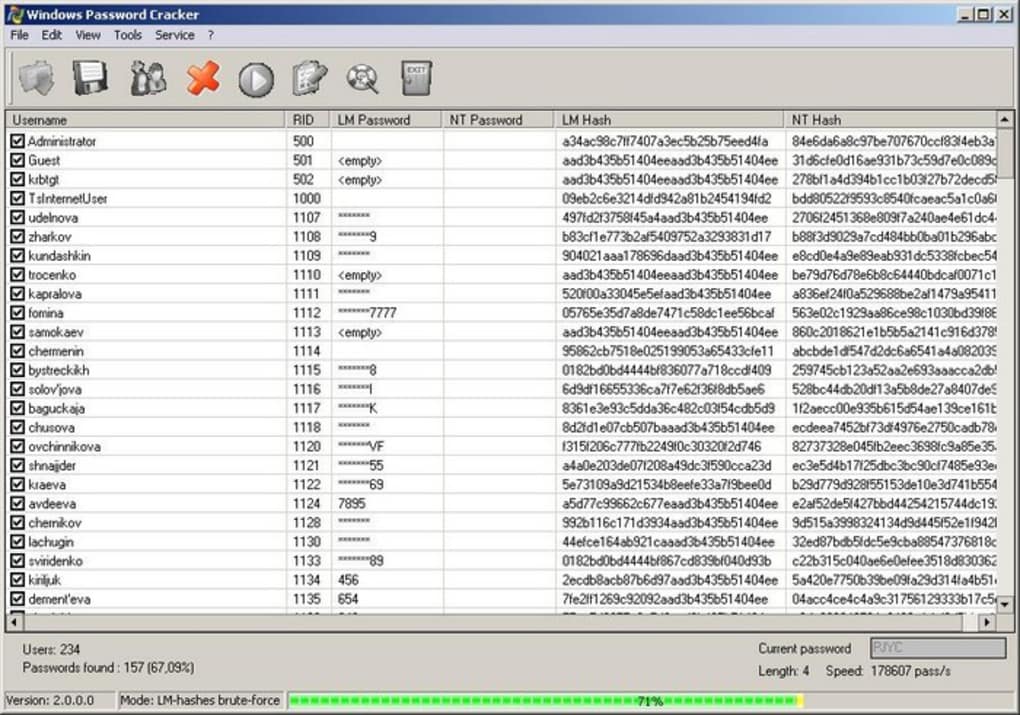
Getting started with Windows Password Cracker is straightforward and designed with user-friendliness in mind. First, download the software from the official website—no registration or payment is required. The installer is lightweight and completes in under a minute, even on older systems. Once installed, launch the application to access the intuitive interface.
Before beginning, ensure your target system is protected by the SYSKEY protocol. You can verify this by checking the system’s security settings or using a dedicated diagnostic tool. If SYSKEY is enabled, proceed to the next step. In the software, select the drive or system partition where the Windows login is stored. The tool will then begin scanning for the password hash.
Next, choose your recovery method: dictionary attack (faster, ideal for common passwords) or brute force (more thorough, suitable for complex passwords). You can also customize the character set and length range to refine the search. Once configured, click “Start” and let the software run. As mentioned, it’s best to leave it running overnight for optimal results.
If you need to stop the process temporarily, simply click “Pause.” When you’re ready to continue, select “Resume” to pick up exactly where you left off. This feature is especially useful for users with limited time or those sharing a computer. After the password is recovered, the software displays it clearly on-screen, allowing you to log in immediately. Always remember to update the software regularly to ensure compatibility with the latest Windows versions.
Compatibility and System Requirements
One of the strongest aspects of Windows Password Cracker is its broad compatibility. The software supports Windows 7, 8, 10, and 11 (32-bit and 64-bit), as well as macOS for Apple users. This cross-platform functionality makes it a versatile tool for both home and office environments. For mobile users, the tool can be used via a computer connected to an Android or iOS device through a USB cable, enabling password recovery for linked accounts.
Minimum system requirements are modest: a dual-core processor, 2GB of RAM, and 500MB of free disk space. This means even older machines can run the software efficiently. The tool is designed to use minimal system resources during background processing, so you can continue using your computer for other tasks without significant slowdowns.
It’s important to emphasize that the software only works on systems using the SYSKEY protection protocol. If your Windows installation doesn’t use SYSKEY, this tool will not be effective. However, for compatible systems, it remains one of the most reliable and free password recovery solutions available. Regular updates are released to maintain compatibility with new Windows updates and security patches.
Pros and Cons of Using Windows Password Cracker
Pros
- Completely free with no hidden costs or subscriptions
- Supports multilingual password recovery (over 53,000 characters)
- High-speed processing with over 1 million combinations per hour
- Pause and resume functionality for flexible use
- 100% local processing – no data sent online
- Compatible with Windows, Mac, Android, and iOS
Cons
- Only works on systems with SYSKEY protection enabled
- Can take several hours to crack complex passwords
- Requires technical understanding to set up properly
- Not suitable for advanced encryption or modern security protocols
- May not work on newer Windows 11 systems with enhanced security
Frequently Asked Questions (FAQ)
Is Windows Password Cracker safe to use?
Yes, Windows Password Cracker is safe when used responsibly. It runs locally on your device and does not send any data to external servers. The software is open-source and has been tested for malware, making it a secure option for password recovery.
Can I use it on Windows 11?
It may work on some Windows 11 systems, but only if they are using the SYSKEY protocol. Newer versions of Windows 11 have enhanced security features that may prevent the tool from functioning. Always check compatibility before use.
Do I need to register to download it?
No, Windows Password Cracker is completely free to download and use. There is no registration, no payment, and no hidden fees.
How long does the password recovery process take?
The time varies depending on the password complexity. Simple passwords may be recovered in under an hour, while complex ones could take several hours. It’s recommended to leave the tool running overnight for best results.
Can I recover passwords on Mac or mobile devices?
Yes, the software is compatible with Mac systems. For mobile devices, it can be used indirectly by connecting an Android or iOS device to a computer running the tool.
Final Verdict: A Must-Have Tool for Forgotten Windows Passwords
For anyone who has ever been locked out of their Windows system due to a forgotten password, Windows Password Cracker offers a reliable, free, and secure recovery solution. While it has limitations—such as requiring the SYSKEY protocol and not working on all modern systems—it remains one of the most effective tools in its category. Its combination of a powerful dictionary engine, high-speed processing, and pause/resume functionality makes it a standout choice.
Whether you’re a home user, student, or professional, this software provides peace of mind knowing you can regain access to your data without paying for expensive recovery services. The fact that it’s completely free, ad-free, and privacy-focused adds to its appeal.
Download Windows Password Cracker today and take back control of your digital life. If you’re facing a login issue, this tool might be the key you’ve been looking for.
CTA: Click here to download Windows Password Cracker – Free, Secure, and Ready to Use Now!







